Controls
Njordlinger is laid out for a controller. Unbind Vanilla Controls moves the game's own actions around and gives other mods' actions a button; Perfected Wheeler puts items, spells and powers on a radial wheel. Button names are Xbox names.
Control maps to download
Both maps are drawn from the list's own settings each time this site is built. Click a map for the full-size picture.
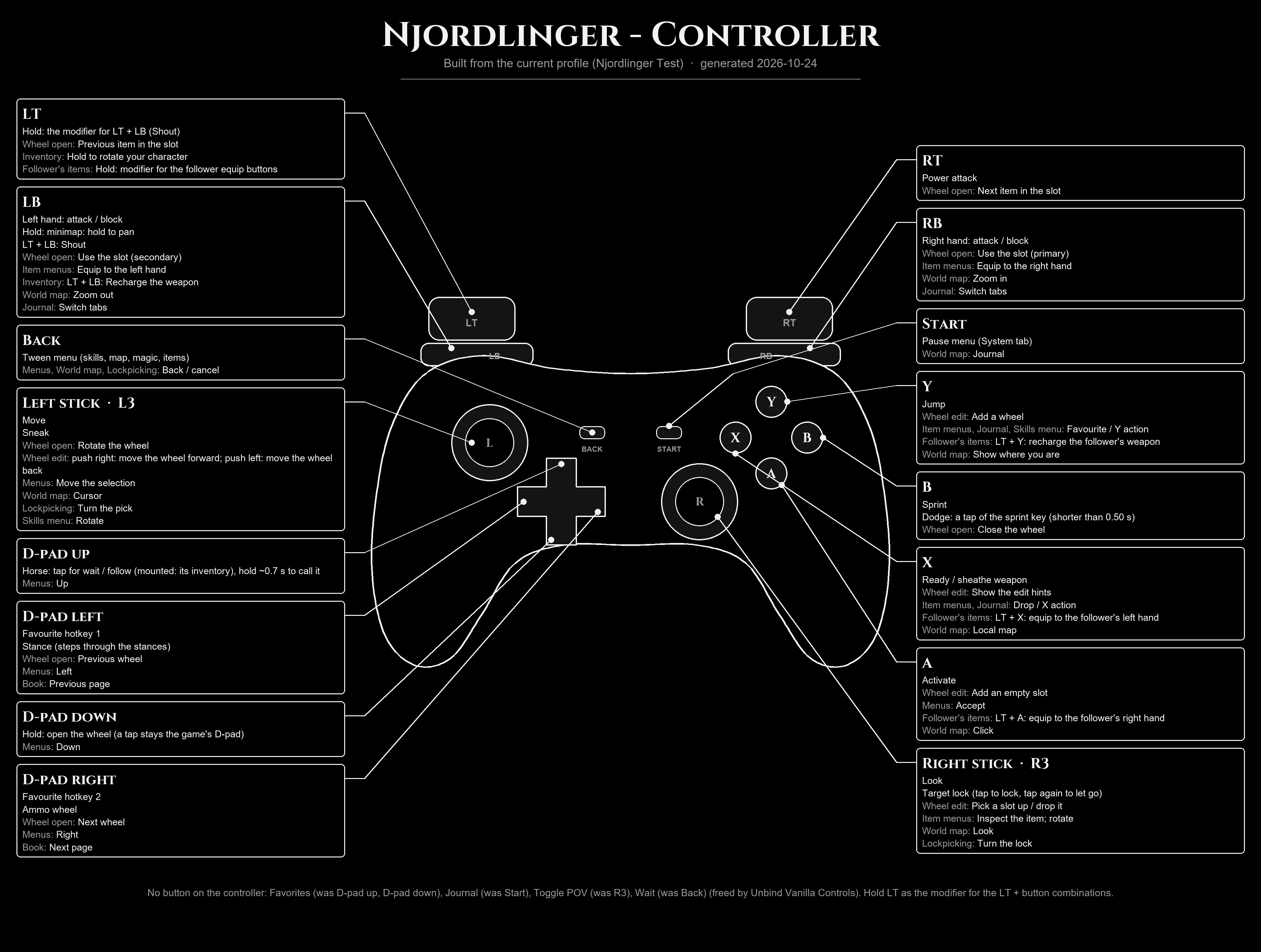
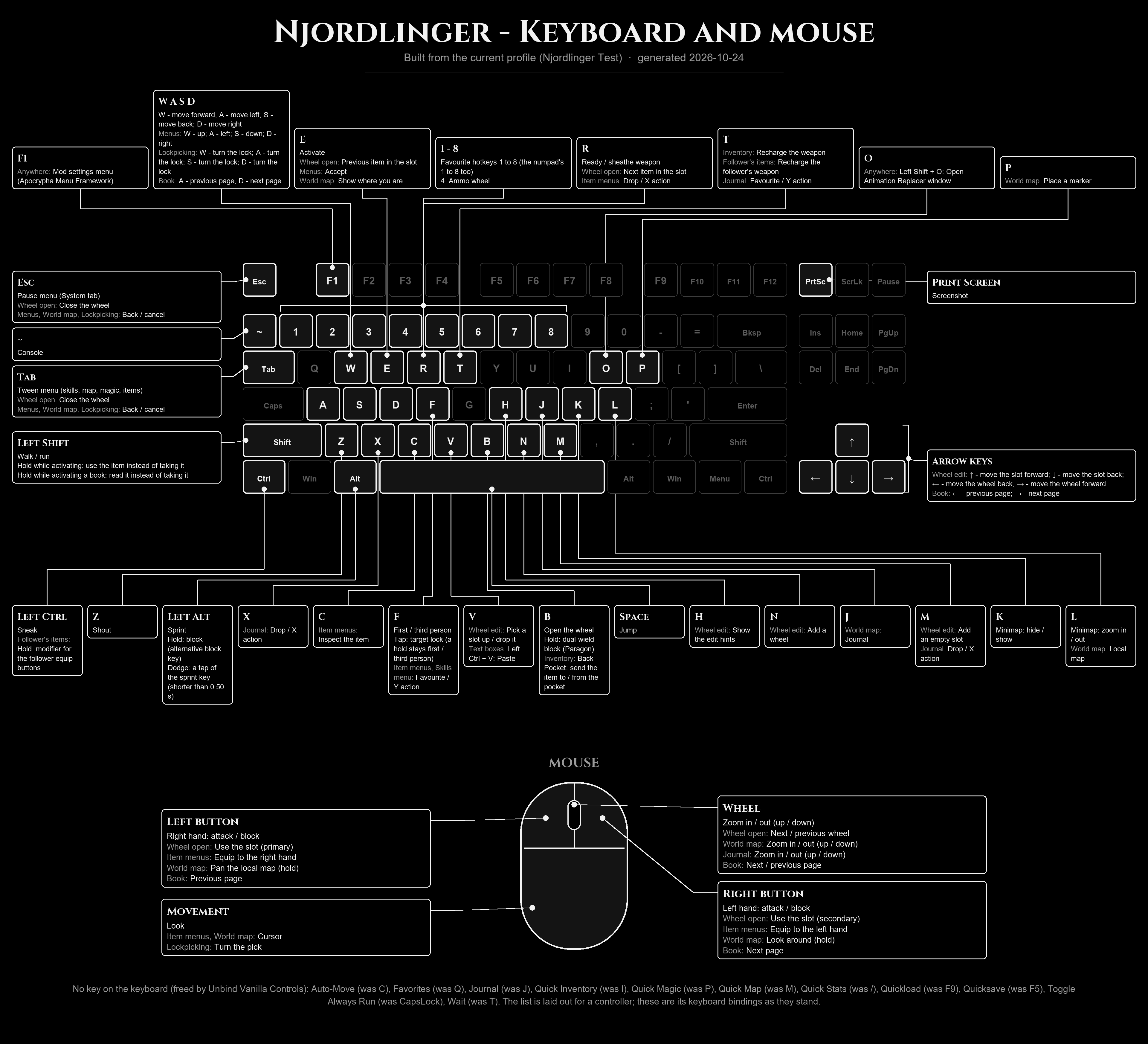
Drawn at build time from data/controlmap-resolved.json, which is resolved from the same live files as the tables below (200 bindings).
In the world
| Button | What it does | From |
|---|---|---|
| Left stick | Move | game |
| Right stick | Look | game |
| A | Activate | game |
| X | Ready or sheathe your weapon | game |
| Y | Jump | game |
| L3 (left stick click) | Sneak | game |
| RB | Right hand: attack, or block | Unbind Vanilla Controls |
| LB | Left hand: attack, or block | Unbind Vanilla Controls |
| RT | Power attack | One Click Power Attack, bound by Unbind Vanilla Controls |
| LT + LB | Shout (LT is the modifier) | Unbind Vanilla Controls |
| B | Sprint. Dodge is on the sprint button too | Unbind Vanilla Controls; TK Dodge |
| R3 (right stick click) | Target lock: tap to lock, tap again to let go | True Directional Movement |
| D-pad down, held | Open the wheel. A tap stays the game's own D-pad | Perfected Wheeler |
| D-pad up | Your horse: tap for wait or follow (when mounted, the horse's inventory); hold for about 0.7 seconds to call it | Simplest Horses, bound by Unbind Vanilla Controls |
| D-pad left | Stance key | Stances NG, bound by Unbind Vanilla Controls |
| Back | Tween menu (skills, map, magic, items) | Unbind Vanilla Controls |
| Start | Pause menu | Unbind Vanilla Controls |
TODO: check the "game" rows (move, look, activate, ready weapon, jump, sneak) in game; they are the Skyrim defaults that Unbind Vanilla Controls does not change. Also say how dodge is triggered (a tap of B, or B with a direction).
TODO: what D-pad right does in the world, if anything (in the wheel it moves to the next wheel; Perfected Wheeler's ammo wheel shipped on D-pad right).
Not bound on the controller
The controller has no button for Wait, the Journal, the vanilla Favorites menu, or Toggle POV (first or third person). Their old buttons were freed for the actions above. The wheel replaces Favorites. TODO: how to wait and how to open the quest journal (the pause menu, the Tween menu, or a wheel entry).
In menus
- Inventory: hold Y on a favourited item to put it in your Back Pocket, or on a pocketed item to take it out. A tap of Y is still the game's Favorite. (Back Pocket For Controller)
- Dialogue: R3 switches between first and third person while you talk. (Switch Camera During Dialogue)
- Text boxes in the mod menus: highlight the box and press A; an on-screen keyboard appears at the bottom of the screen. The D-pad moves across it and A types. (Apocrypha Menu Framework)
The wheel
Hold D-pad down to open Perfected Wheeler. While it is open the game is paused and the left stick moves around the wheel.
| Button | In the wheel |
|---|---|
| D-pad right / D-pad left | Next / previous wheel |
| RT / LT | Next / previous item in a slot |
| RB / LB | Use the slot's primary / secondary action |
| B | Close the wheel |
| L3 | Rotate the wheel |
Edit mode, for building your own wheels:
| Button | In edit mode |
|---|---|
| Y | Add a wheel |
| A | Add an empty slot |
| X | Show the edit hints |
| R3 | Pick a slot up, move it, press again to drop it |
| Left stick right / left | Move the whole wheel forward / back |
TODO: how a player enters edit mode, and which RB / LB action equips to which hand.
Keyboard and mouse
The list can be played on a keyboard, but it is not laid out for one. Unbind Vanilla Controls leaves the keyboard's Journal, Quick Inventory, Quick Magic, Quick Map, Quick Stats, Wait, Favorites, Quick Save, Quick Load, Auto-Move and Toggle Always Run keys unbound. B opens the wheel, F1 opens the mod settings menu, and on the keyboard a tap of F (Toggle POV) is the target lock.
TODO: a full keyboard table, if keyboard players are to be supported.
Read from the list's own settings
These tables are read from the settings files the list actually loads each time this site is built, so they follow the list when a binding changes.
| Action | Device | Button / key |
|---|---|---|
| Pause | Controller | Start |
| Tween Menu | Controller | Back |
| Shout | Controller | LT + LB |
| Right Attack/Block | Controller | RB |
| Left Attack/Block | Controller | LB |
| Sprint | Controller | B |
| Power Attack | Controller | RT |
| Stance | Controller | D-pad left |
| Wheel Menu | Keyboard | B |
| Back Pocket | Keyboard | B |
| Call Horse | Controller | D-pad up |
| Action | Device |
|---|---|
| Journal | Keyboard |
| Quick Inventory | Keyboard |
| Quick Magic | Keyboard |
| Quick Map | Keyboard |
| Quick Stats | Keyboard |
| Wait | Keyboard |
| Wait | Controller |
| Journal | Controller |
| Favorites | Keyboard |
| Quickload | Keyboard |
| Auto-Move | Keyboard |
| Toggle Always Run | Keyboard |
| Favorites | Controller |
| Quicksave | Keyboard |
| Toggle POV | Controller |
| Row | State |
|---|---|
| Quicksave | hidden |
| Save | shown |
| Load | shown |
| Installed Content | hidden |
| Creations | hidden |
| Settings | shown |
| Mod Configuration | shown |
| Controls | shown |
| Help | hidden |
| Quit | shown |
| Wheel action | Button |
|---|---|
| Toggle wheel | D-pad down |
| Toggle edit hints | X |
| Next wheel | D-pad right |
| Prev wheel | D-pad left |
| Next item | RT |
| Prev item | LT |
| Activate primary | RB |
| Activate secondary | LB |
| Add wheel | Y |
| Add empty entry | A |
| Move wheel forward | Left stick right |
| Move wheel back | Left stick left |
| Exit wheel | B |
| Pick up slot | R3 (right stick click) |
| Rotate wheel | L3 (left stick click) |
| Action | Button / key |
|---|---|
| Target lock (True Directional Movement) | R3 (right stick click) |
| Power attack (OCPA) | RT |
| High stance (Stances NG) | unbound |
| Mid stance (Stances NG) | D-pad left |
| Low stance (Stances NG) | unbound |
Read at build time from: mods\test Unbind Vanilla Controls 1.1.3\SKSE\Plugins\UnbindControls.ini, overwrite\SKSE\Plugins\wheeler\Controls.ini, mods\Custom - Camera and Horse Settings\MCM\Settings\TrueDirectionalMovement.ini, overwrite\MCM\Settings\OCPA.ini, mods\Stances NG\SKSE\Plugins\StancesNG.ini